How to Use Claude Code: Beginner Tutorial in 5 Settings (No Coding)
 Maximin
- Published
- 5 min read
- 5 min read
Key takeaways
- Claude Code works in a folder on your computer. It creates, edits, and sorts files, where the chat only answers.
- You need the Pro plan, $20 a month. Installing it takes about a minute.
- Pick the model for the task. Chat and Code share the same 5-hour and weekly limits.
- CLAUDE.md and auto memory keep your project rules from one session to the next.
- A skill turns a task you repeat into one command, and scheduled tasks run it even when you are away.
- You don't need to code. You describe what you want and ask for changes.
Start using Claude Code tonight
The free guide covers the install, the 5 settings, and every prompt from the video.
Get the free guideWhat is Claude Code?
When you open the Claude app, you see several tabs. The one everyone knows is Chat: you ask a question, Claude answers, and you do the rest. It never touches your files.
Right next to it is the Code tab. That is Claude Code. The difference: Claude works directly in a folder on your computer. It can create files, change them, and sort them. In short, it does the work.
| Chat | Claude Code | |
|---|---|---|
| Answers questions | Yes | Yes |
| Works in your files | No | Yes, in the folder you pick |
| Remembers your project rules | No | Yes, with CLAUDE.md and memory |
| Runs while you are away | No | Yes, with scheduled tasks |
| Plan | Free and up | Pro, $20 a month, and up |
How to install Claude Code
- Download the Claude app installer for your system (Mac or Windows).
- Sign in to your Claude account.
- Open the app and go to the Code tab.
- Pick the folder you want to work in, then ask for what you want.
If the result is not what you expected, just ask Claude to change it. That's the whole loop. Prefer the terminal? See how to install Claude Code on Windows, Mac, and Linux, and check whether Claude Code is free before you pick a plan.
The 5 Claude Code settings to know
1. The right model for the task
Under the text box, bottom right, you pick the model: the brain that does the work. Opus is for big jobs, Sonnet for everyday work, Haiku is the fastest and cheapest, and Fable is the strongest. Below it, the effort level (from low to max) sets how long Claude thinks before it answers.
It matters because Claude counts everything in tokens, and it reads about 200 times more than it writes. What uses up your limits is not just your prompt, it is everything you give it to read. You have a 5-hour limit and a weekly limit, and Chat and Code draw from the same limits.
2. The right mode
Next to the model, the mode sets how often Claude asks your permission before it acts. There are 5 modes, from the default mode to bypass, where Claude runs commands and edits files without asking.
3. Memory: CLAUDE.md and auto memory
Each conversation is a session, and each new session starts from zero. Two things carry your rules over. First, CLAUDE.md, a file Claude reads at the start of every session. Type /init and Claude writes it for you from your folder. Keep it under 200 lines, since Claude rereads it every time.
Second, auto memory, on by default. When you correct Claude, it takes its own notes and rereads them next time. You write CLAUDE.md; Claude writes the notes.
4. Skills: one command for a task you repeat
A skill is a file of instructions: the steps, the rules, and the result you want. To make one, do the task once with Claude, then ask it to turn it into a global skill, so you can use it in all your projects. Run it with / followed by its name. Claude sometimes runs it on its own when your request fits.
Claude can also create artifacts (a document, a deck, a design, or a small tool next to the conversation), use your apps through connectors (Notion, Figma, Gmail), install plugins (ready-made packs of skills and connectors), and change the app itself with mods.
5. Work that runs without you
- Subagents: Claude sends helpers to do several pieces of work at once, and they report back a summary.
- /goal: you give a finish line and Claude keeps going until it is reached. Write it clearly, or it may go in circles.
- Scheduled tasks: work Claude starts on its own at a set time. Local tasks need the app open and the computer on; cloud tasks run even when it is off.
- Claude Code Projects (in beta when I made the video): send a task through an API and threads run in parallel in the cloud.
- Remote control: follow Claude and talk to it from your iPhone.
Get the free Claude Code guide
Every setting from this article, step by step, with all the prompts ready to copy.
Download the guide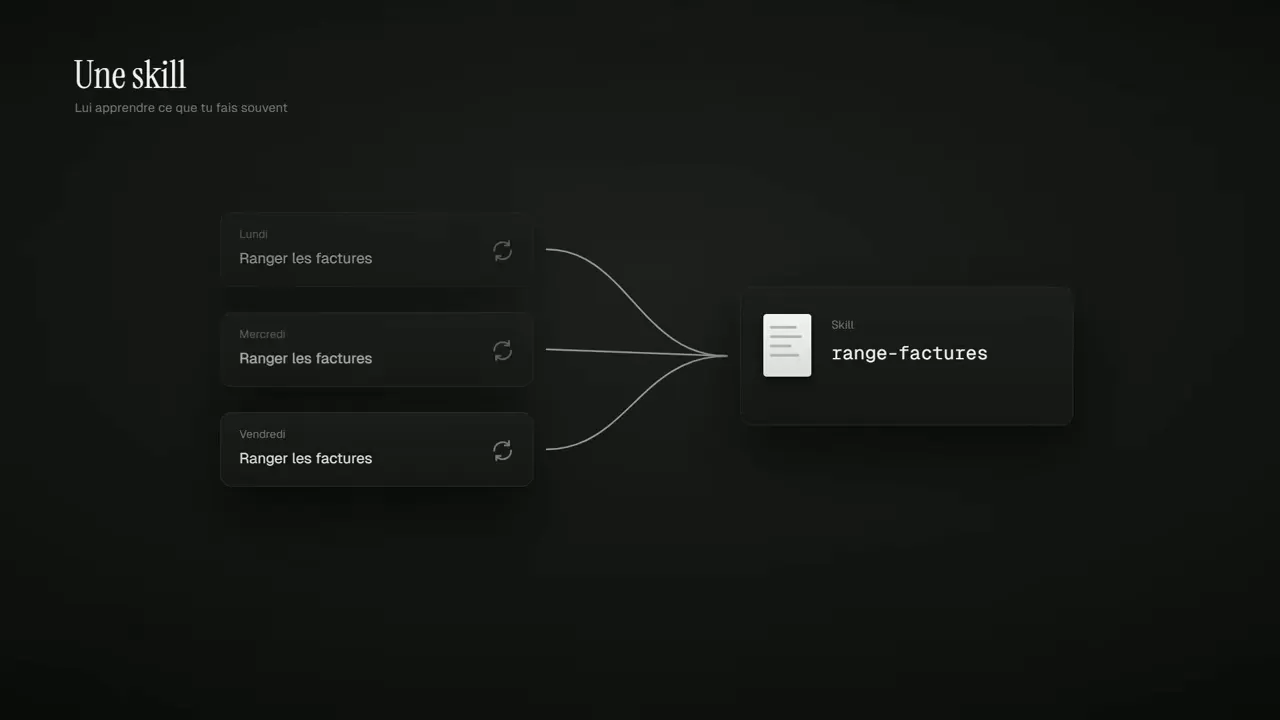
Where to start with Claude Code
Start with the first two settings tonight: pick the right model and the right mode. They save time right away. Then run /init in your main folder so Claude stops starting from zero (here is what to put in CLAUDE.md). Once you catch yourself repeating a task, turn it into a skill. Leave scheduled tasks for last, when you trust the result. The whole path, step by step, is in the Claude Code guide.
Who is Claude Code for?
People who use Claude like a chat
If you copy Claude's answers and do the work yourself, Claude Code does that part for you.
Creators and freelancers
Repetitive tasks become skills, and skills can run on a schedule.
Non-coders
You describe the result in plain words. Claude writes the files.
Frequently asked questions
Do I need to know how to code to use Claude Code?
No. You describe what you want in the Code tab of the Claude app, and Claude does the work in your folder. If the result is wrong, you ask for a change.
How much does Claude Code cost?
Claude Code needs at least the Pro plan, $20 a month. Chat and Code share the same 5-hour and weekly limits.
What is CLAUDE.md?
A file of project rules Claude reads at the start of every session. Type /init and Claude writes it for you; keep it under 200 lines.
What is a Claude Code skill?
A file of instructions that teaches Claude a task you do often. You run it with a slash and its name, in any project if it is global.
Is the Claude Code guide free?
Yes. The guide and all its prompts are free to download. Get the guide
About the author
 Maximin
I’m a software engineer, and I help businesses and individuals turn their ideas into real projects with AI agents.