ChatGPT Agent Mode: What Replaced It and What to Use in 2026
 Maximin
- Published
- 4 min read
- 4 min read
Key takeaways
- ChatGPT agent mode is no longer available. OpenAI's help page now says to use ChatGPT Work for longer, multi-step tasks and the cloud browser for browser workflows.
- Agent mode worked on a virtual computer: it browsed, clicked, and filled in forms for you, and paused when it needed a login or your approval.
- It was paid only: 40 tasks a month on Plus and 400 on Pro. It also took over Operator.
- ChatGPT Work turns your apps, files, and tools into finished docs, decks, spreadsheets, and reports. It is available on all plans on desktop.
- For clicks in websites and apps, use browser use and computer use in the ChatGPT desktop app.
Hand ChatGPT your first task
The free guide shows how to set up browser use and computer use, with 4 real tasks.
Get the free guideWhat was ChatGPT agent mode?
ChatGPT agent mode let ChatGPT do a task instead of only answering. You described the task, and it worked on its own virtual computer: it opened websites, clicked, filled in forms, and used your connected apps for research. You could guide it or stop it at any time.
You started it from the tools menu or by typing /agent in the message box. It also replaced Operator, OpenAI's earlier browsing agent, whose website closed.
Today, OpenAI's help page says it plainly: "ChatGPT agent is no longer available." It points to ChatGPT Work for longer tasks and to the cloud browser for browser workflows.
How ChatGPT agent mode worked
- Screenshots: it looked at screenshots of its virtual browser to see the page, then clicked and typed.
- Takeover mode: when a site needed a login, it paused and asked you to take over the browser. No screenshots were taken while you typed.
- Confirmations: it asked you before high-impact actions, and refused tasks it was not allowed to do.
- Watch mode: on some sites, it only kept working while you watched.
- Repeat tasks: after a task, you could make it run daily, weekly, or monthly from the clock icon.
| Plan | Agent tasks per month |
|---|---|
| Free | Not available |
| Plus | 40 |
| Pro | 400 |
| Business and Enterprise | 40 (or 30 credits per task with flexible pricing) |
Only the task you started counted. Questions it asked you along the way and login steps did not.
What replaced ChatGPT agent mode?
ChatGPT Work: for multi-step tasks
ChatGPT Work is what OpenAI now suggests for long tasks. It uses your apps, files, tools, and browser to make finished work: docs, decks, spreadsheets, sites, reports, and analyses. In Plan mode, it gathers context, asks you questions, and writes a step-by-step plan you approve before it starts. You can also schedule tasks that come back every week.
OpenAI says it is available on all plans on desktop, and on Plus, Pro, Business, Enterprise, and Edu on the web and on mobile.
The cloud browser: for web tasks
For tasks inside websites, OpenAI points to the cloud browser: a browser that runs on a separate computer in the cloud, with its own cookies and sessions. It doesn't use the passwords or logins of your own browser. ChatGPT decides when to use it, asks before it visits a new site, and can ask you to take over.
Browser use and computer use: on your own computer
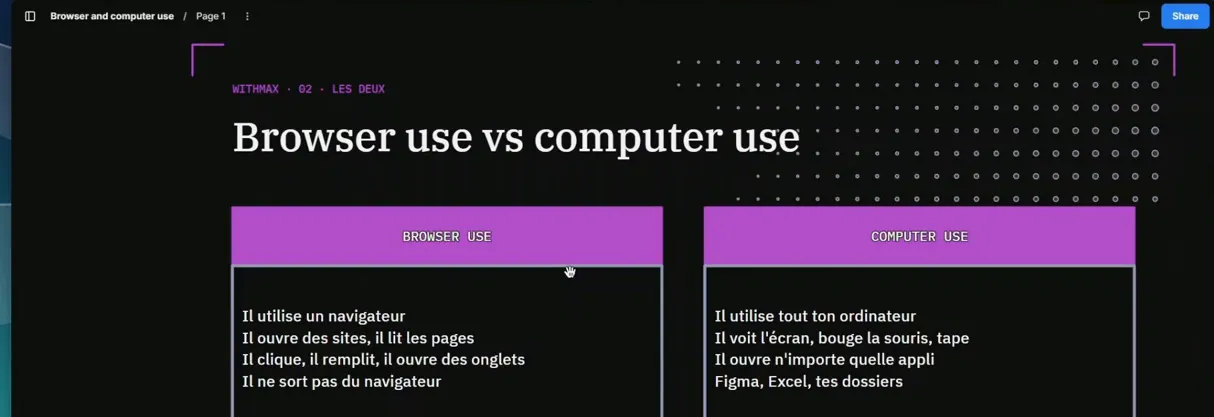
In the ChatGPT desktop app, browser use works in a built-in browser or your Chrome, and computer use can also use the apps installed on your computer. I tested both in ChatGPT computer use vs browser use.
Agent mode alternatives: which one to use
| Your task | Use | Why |
|---|---|---|
| A report, a deck, or a spreadsheet from your files and apps | ChatGPT Work | Plans first, then makes the finished file |
| A task in a website that can run in the background | Cloud browser | Runs remotely, apart from your own browser |
| Clicks in a website you are logged into | Browser use (desktop app) | Works in a browser on your computer |
| Clicks in an app with no website | Computer use (desktop app) | Controls the apps on your computer |
| An app that has a connector, like Notion or Canva | The connector | Faster and more reliable than clicking |
Want an agent outside ChatGPT? Claude can also control a computer. I compare them in computer use agents.
Get the free guide
Setup, 4 real tasks, and ready-to-copy prompts for browser use and computer use.
Download the guideUsing AI agents safely
OpenAI's main warning about agent mode still applies to every agent that browses for you: prompt injection. A web page can hide instructions that try to trick the agent, like sending a reset code to a stranger.
- Turn on only the apps the task needs.
- Never type passwords in the chat. Take over the browser for logins.
- Avoid vague prompts like "check my email and handle everything."
- Stop the task as soon as something looks wrong.
Frequently asked questions
Is ChatGPT agent mode still available?
No. OpenAI's help page says ChatGPT agent is no longer available. It suggests ChatGPT Work for multi-step tasks and the cloud browser for browser workflows.
What replaced ChatGPT agent mode?
ChatGPT Work for long tasks and finished files, and the cloud browser for web tasks. In the desktop app, browser use and computer use also take actions on your computer.
How did I turn on agent mode in ChatGPT?
You picked agent mode in the tools menu or typed /agent in the message box. Today, use ChatGPT Work or the desktop app's browser use and computer use instead.
Was ChatGPT agent mode free?
No. It was on paid plans only: 40 tasks a month on Plus and 400 on Pro. ChatGPT Work is available on all plans in the desktop app.
Is ChatGPT agent the same as Operator?
Operator was OpenAI's first browsing agent. Its features moved into ChatGPT agent mode, and the Operator website closed.
About the author
 Maximin
I’m a software engineer, and I help businesses and individuals turn their ideas into real projects with AI agents.