Build a ClickUp Clone with Next.js, Convex and AI Agents
 Maximin
- Published
- 4 min read
- 4 min read
Key takeaways
- The app has spaces, lists, and tasks, with a list view and a board view, synced in real time by Convex.
- An AI brain answers about your workspace, a space, or a single list, and creates or finds tasks for you.
- Super agents run on their own, on a schedule, and you can chat with them directly.
- The stack: Next.js, shadcn/ui, Convex (database, functions, agents, crons), WorkOS, tRPC, and Vercel.
- Chapter 1 sets up the foundation: Next.js 16.1.6, shadcn/ui, dark mode, route groups, type-safe env vars, and GitHub.
- The full source code is free on WithMax.
Build your own ClickUp clone
Get the full source code for free and follow the series chapter by chapter.
Get the source codeWhat the ClickUp clone does
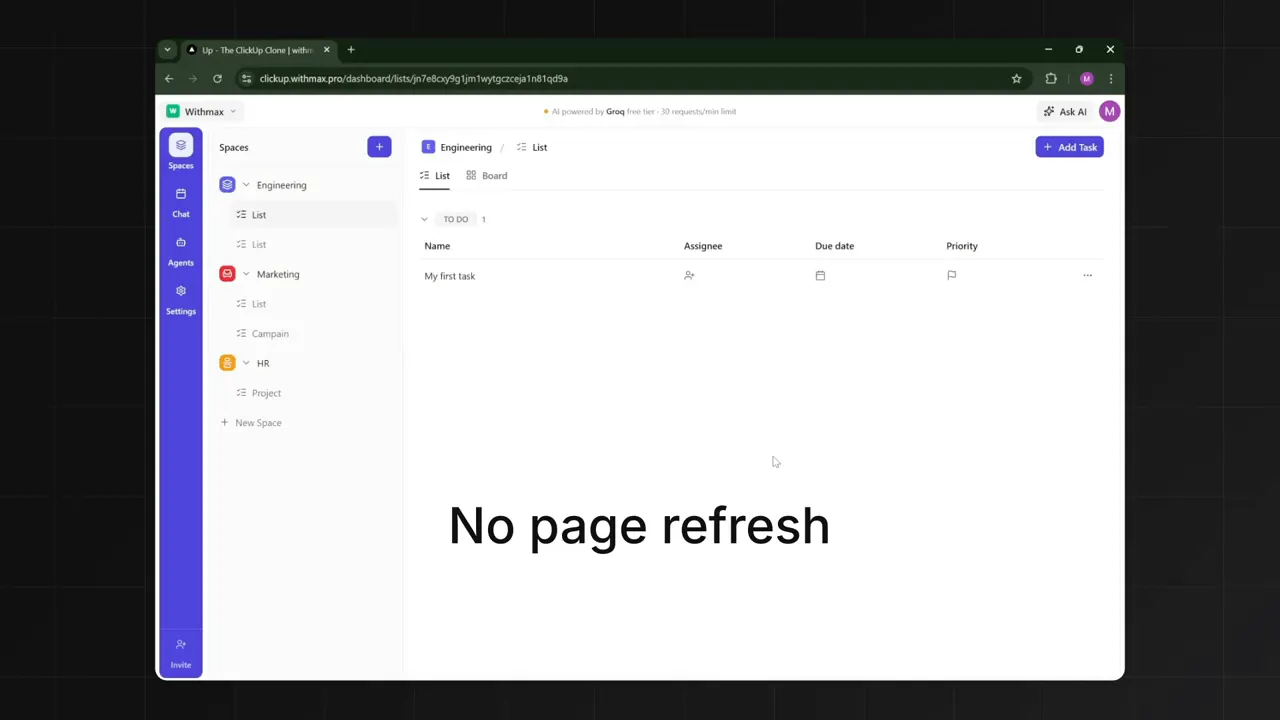
After a 3-step setup, you land on the dashboard. You create spaces (a name, an icon, a color), lists inside each space, and your tasks inside each list. You can drag spaces to reorder them, collapse them, and move a list from one space to another. Every change syncs in real time on every device, with no refresh.
Still comparing tools? See the 7 best ClickUp alternatives.
List view and board view
In list view, you assign tasks, set due dates, and set a priority. In board view, you create tasks quickly and drag them between statuses.
The AI brain
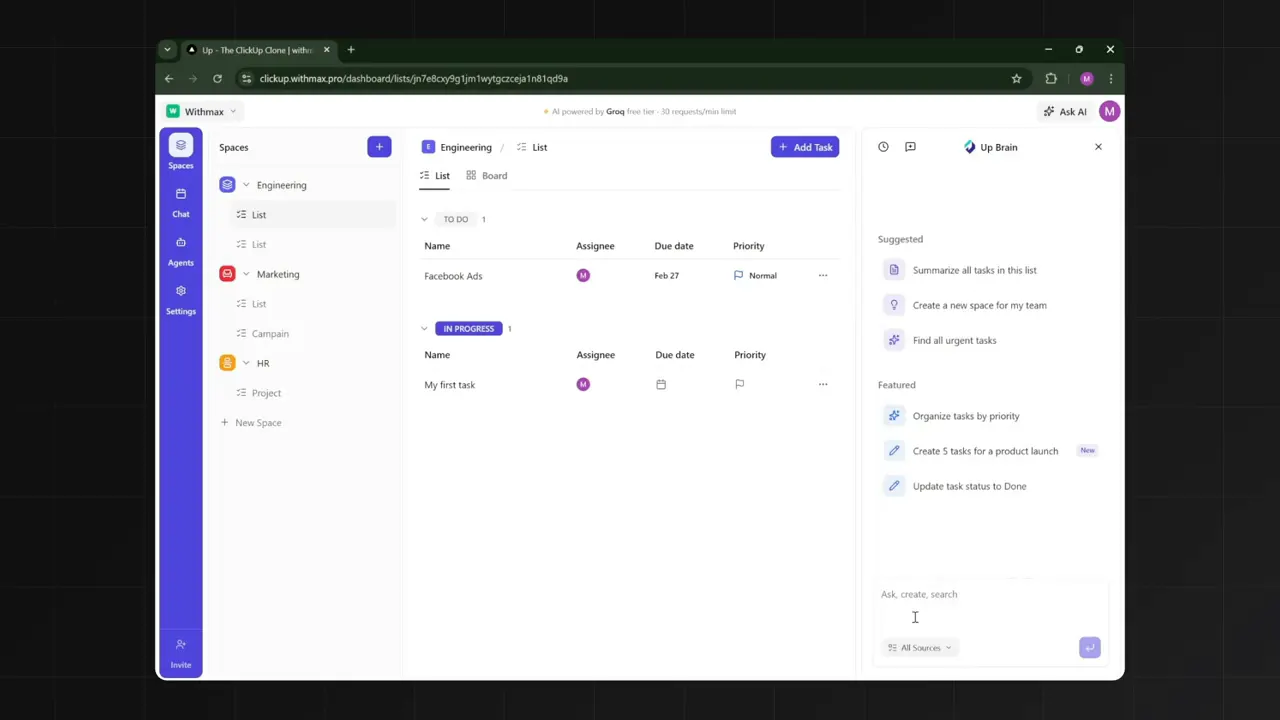
At the bottom of the chat, you tell the AI what to focus on: the whole workspace, one space, or one list. It knows where you are, so its answers stay relevant. Ask it to create spaces, find tasks, or summarize your work. You can start a new thread or reopen an old one from history.
Super agents
Super agents run without you asking. When you create one, the AI fills in its instructions, avatar, permissions, triggers, and tools. Set a schedule, like every morning, and it runs by itself. Open a direct chat to give it instructions or see what it is doing in real time.
The ClickUp clone tech stack
| Tool | Role |
|---|---|
| Next.js + React | Front end |
| shadcn/ui | UI components |
| Convex | Database, server functions, real-time sync |
| Convex AI agents | The AI brain and super agents |
| Convex crons | Scheduled agents |
| WorkOS | Enterprise-grade login and security |
| tRPC | End-to-end type safety |
| Vercel | Deployment and hosting |
Get the full source code
The whole ClickUp clone, free: workspaces, tasks, chat, and AI agents.
Download the codeChapter 1: set up the Next.js project
1. Check Node.js
Next.js runs on Node.js. Run node -v in your terminal (I'm on Node 22). If your version is too old, install the latest one.
2. Create the app
Use the official CLI, pinned to version 16.1.6 so everything stays consistent. Choose customize settings, then:
- TypeScript: yes
- ESLint: yes
- React Compiler: yes
- Tailwind CSS: yes
srcdirectory: yes- App Router: yes
- Import alias: no
3. Add shadcn/ui
Run the shadcn init command with the default settings. It creates lib/utils (the cn helper) and components.json. Add the button, then every component at once with the --all flag. Wrap your app in TooltipProvider in the root layout.
4. Add dark mode
Install next-themes, create a ThemeProvider, wrap the app in it, and add suppressHydrationWarning to the html tag. Then add a mode toggle to switch between light and dark.
5. Organize with route groups
Create two route groups: (auth) for sign-in, sign-up, and onboarding, and (main) for the dashboard. Route groups organize your files without changing the URL. Add a features folder to group code by what it does.
6. Type-safe environment variables
Use T3 Env with Zod. Server variables (like API keys) stay on the server; client variables must start with NEXT_PUBLIC_. If a variable is missing or wrong, you get an error at build time instead of at runtime.
7. Push to GitHub
Create a repository, then git init, git add ., commit, rename the branch to main, add the remote, and push. From here, every feature gets its own branch and pull request.
Who is this ClickUp clone for?
Developers who learn from real code
Study a full SaaS with real-time data, auth, and AI agents.
Founders who want to launch faster
Start from a working product instead of an empty folder.
Freelancers
Use it as a production-ready starter for client projects.
Frequently asked questions
Is the ClickUp clone source code free?
Yes. The full source code is free, with lifetime access to updates. Get the code
Which stack does the ClickUp clone use?
Next.js and React, shadcn/ui, Convex for the backend, AI agents, and crons, WorkOS for login, tRPC, and Vercel for hosting.
Can I use it in a commercial project?
Yes. You can use the code in personal or commercial projects.
Can I see it live?
Yes. A live version runs at clickup.withmax.pro.
About the author
 Maximin
I’m a software engineer, and I help businesses and individuals turn their ideas into real projects with AI agents.